

Customer Portal Software

Less effort, faster workflows

A customer portal isn't a pure software project, it's a digitization project. Before development starts, the workflows need to be understood — along with the places where they can improve. The result is customer portal software that maps real business processes instead of forcing a standard product on top of them.
Book a discovery call
40k
SIXT Partner Hub — booking platform for travel agencies in 147 countries
The problem

Legacy processes no one maps digitally anymore

In many companies, workflows have grown over years — mostly via email, phone, and Excel. Customers and partners want to view orders, documents, and status themselves. As long as this self-service is missing, every request runs through the internal team.
  • The back office answers the same questions
    about order status, dates, and documents over and over.
  • Customer data and records are scattered
    across email, Excel, and multiple systems that don't talk to each other.
  • Off-the-shelf portal solutions only half-map your workflows
    the rest stays manual work.
Our approach

Digitize processes, not just forms

At Webnique, a customer portal takes shape in four steps — and the first has nothing to do with code. First, the business processes are analyzed and optimized where it makes sense, then the right web application is built. The portal becomes a reflection of better workflows, not a digital copy of old detours.

Analysis & Consulting

Mapping the business processes, evaluating the existing system landscape, and identifying what's worth optimizing before digitization.

Concept & Architecture

Defining functions, roles, permissions, and data structure, and translating the optimized processes into a clear portal concept.

Development & Integration

Developing a secure, scalable web application and connecting it to CRM, ERP, and other systems via clean interfaces.

Operations & Further Development

Ongoing operations, security, and updates, plus new functions as demand grows.
Result
01
Challenge
An existing booking portal with outdated design, no integrated rebooking and cancellation function, and a far from intuitive booking process.
02
Approach
Relaunch of the B2B booking platform with a user-friendly interface, seamless API integration, two-factor authentication, and a clear report page for bookings and revenue.
03
Results
A fast, secure platform for over 40,000 travel agencies in 147 countries — top security standards and a significantly simplified booking process.

How we work.

A dedicated contact person

One dedicated contact knows the project from day one. Collaboration runs in clear phases with fixed touchpoints and feedback loops — knowledge about customers and processes flows directly into the concept.

Flexible or fixed-price project

Choose between a flexible monthly hours model (cancel monthly) and a clearly calculated fixed-price project. It ends with a complete handover: everything created belongs to the customer. On request, we continue operations and train your team in working with the portal.
Consulting

Process Audit & Requirements Workshop

It doesn't start with a spec document, it starts with a workshop. Together, we analyze the business processes and evaluate the existing system landscape — what works well, what slows things down, what can be streamlined before digitization. Only on this basis do we decide which functions the portal really needs. Digital or on-site, whatever fits the project.

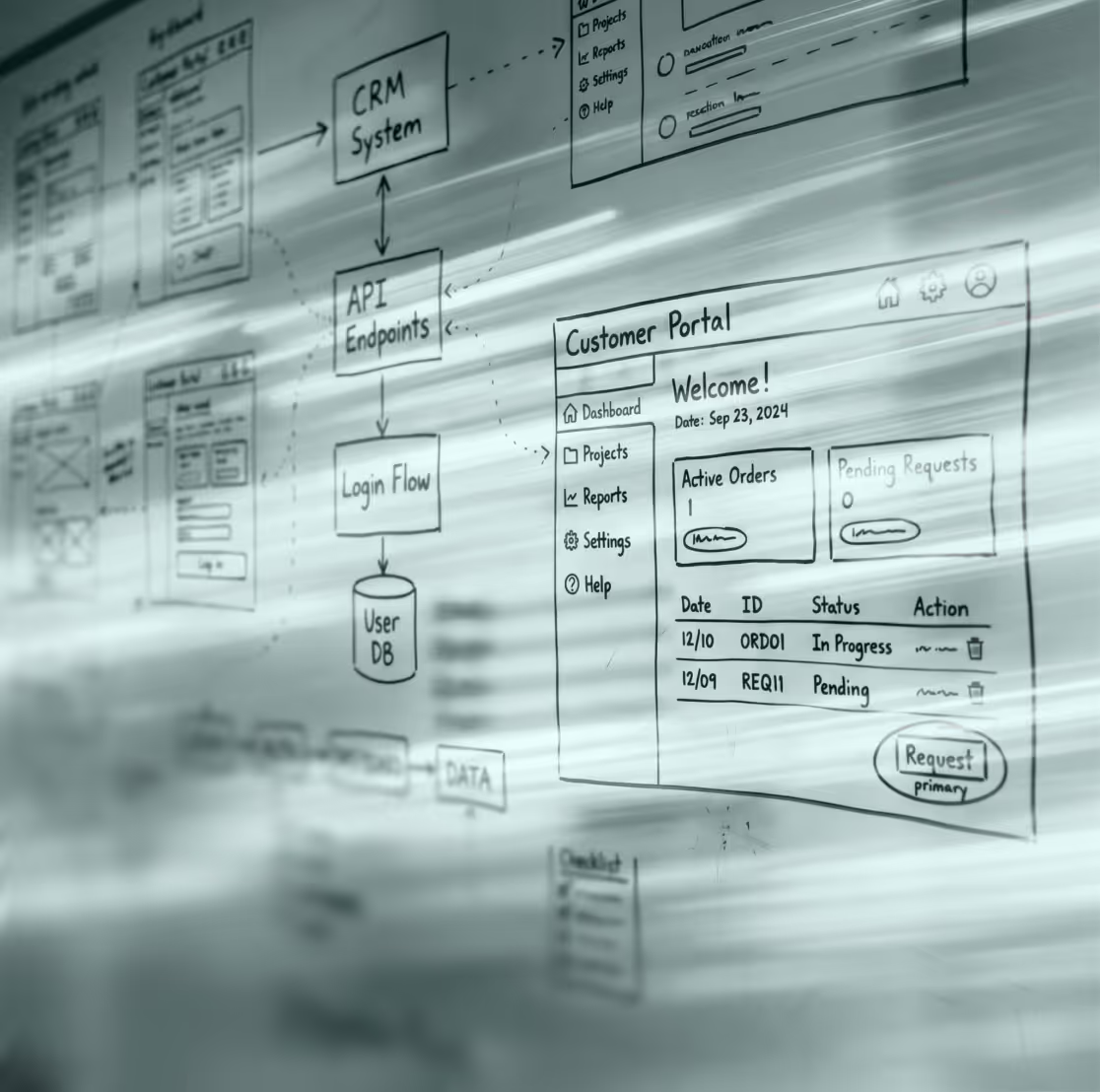
Request a workshop

Why companies develop their customer portal with Webnique

Webnique isn't a pure software shop working through a spec document. The biggest lever isn't in the code but in the processes before it — and that's exactly where the work begins. As a digital agency, process consulting, clean development, integration know-how, and UX design come from one team. The result is customer portal software that gets used because it simplifies real workflows — and grows with the company.


In Detail

Building a customer portal — from process analysis to launch

01.

Process Audit & System Landscape

Before features come into play, it's about the workflows.
How do orders, requests, and documents move through the company today? Which systems are in use, where do breaks and duplicate work occur? The audit is the foundation — it determines whether a portal delivers real relief or just becomes another tool.
01.

Process Optimization

Not every legacy workflow should be digitized one to one.
Where detours, media breaks, or unnecessary steps become visible, improvement proposals are put on the table. The goal is a portal that maps optimized processes. Otherwise, old inefficiencies just get cemented into new software.
01.

Roles & Permissions Concept

Everyone sees exactly what they're supposed to see — and nothing more.
Which customers, employees, and partners get which access? We define roles and access rights cleanly. That's the foundation for security and a clear user experience.
01.

UX Concept & Wireframes

The portal's structure takes shape before it gets built.
In wireframes, we define how users navigate, where each piece of information lives, and how self-service functions work. This shows early on whether the experience is intuitive. Corrections at this stage cost a fraction of what they would cost later.
01.

Data Structure & Architecture

A well-thought-out data architecture decides the portal's future.
We define which data the portal manages and how it's structured. This determines whether a portal stays performant and can be extended later. Without clean architecture, every extension becomes a rebuild.
01.

Web Application Development

The portal is built as a modern, scalable web application.
Secure, scalable, and usable on every device. Proven technologies and clean code ensure the portal stays maintainable long term instead of turning into a black box.
01.

Interfaces & Integration

A portal only delivers its value once it talks to existing systems.
Through clean interfaces, we connect CRM, ERP, billing systems, or document management. Data no longer needs to be maintained twice and stays current everywhere. With the SIXT Partner Hub, this seamless API integration was a key lever.
01.

Security & Data Protection

Customer data demands special protection.
Encrypted connections, secure authentication — up to two-factor authentication — and a cleanly separated permission system. GDPR-compliant data protection is part of the architecture from day one, not an afterthought.
01.

Self-Service Functions

The core of a good portal is the tasks customers handle themselves.
Downloading documents, checking order status, submitting requests, updating data. We build exactly the functions that relieve the back office and save customers extra steps. Every task the portal takes over no longer lands in the team's inbox.
01.

Testing, Launch & Operations

Thorough testing before go-live — then further development begins.
We test functions, permissions, interfaces, and security, and support the rollout. After launch, the portal stays secure and up to date, with new functions added as demand grows. This way, the customer portal evolves with the company.

How much workload could a portal take off your team?

A short conversation is enough to find out which processes are worth a customer portal — and what a first step could look like.
Book a discovery call
Frequently asked questions

FAQs

What does it cost to develop a customer portal?

That depends on the feature set and the required integrations. A lean portal with basic self-service functions starts in the low five-figure range, while complex portals with many integrations sit above that. After the process audit and concept workshop, you get a clear cost estimate with a defined scope.

How long does it take to build a customer portal?

A first functional portal can often be delivered in 8 to 16 weeks, depending on scope and integrations. The usual approach is to start with a focused first version that is expanded step by step.

Off-the-shelf software or a custom customer portal — which is better?

Standard solutions are quick to launch but hit their limits as soon as processes deviate from the standard. A custom customer portal maps your exact workflows and connects to existing systems — usually the more sustainable solution for specific processes.

Isn't a customer portal more of a consulting project than a software project?

Both. The software part is only as good as the processes behind it. That's why it starts with a process audit, followed by optimizing the workflows, and only then development. Process consulting and development come from one team, instead of you having to coordinate two providers.

Can a customer portal connect to CRM or ERP systems?

Yes. Connecting to existing systems is one of the biggest levers of a customer portal. Through interfaces, the portal is linked with CRM, ERP, billing, or document management, so data is maintained in one place and stays current everywhere.

How secure is a customer portal?

With customer data, security is the baseline requirement. Encrypted connections, secure authentication, and a clean roles and permissions system are standard. GDPR-compliant data protection is part of the architecture from the start.

Do we own the finished customer portal?

Yes. Everything that's created belongs to the customer — code, design, and data. The handover is complete and documented. Ongoing operations are available on request, but there's no lock-in to the agency.